 Tooly
ToolyGetting a new phone shouldn't mean losing the numbers you only ever saved in WhatsApp. WhatsApp itself has no "export contacts" button — and it never shows the numbers of people you've chatted with but not saved. Tooly reads them from your own signed-in WhatsApp Web session and writes them to a file your new phone understands. Here are the two ways to do it.
Two ways to move your contacts
vCard straight to the phone
Export a .vcf file and open it on the new phone. Nothing else needed — works offline, on iPhone and Android.
Via Google Contacts
Export a CSV, import it into Google Contacts, and it syncs to any phone you sign in on.
Route A — vCard to your new phone
- Install Tooly
Add it from the Chrome Web Store — no sign-up, and the vCard export is free.
- Open WhatsApp Web & scan
Sign in at web.whatsapp.com, open the Tooly side panel and hit Scan WhatsApp. Everything is read on your own computer — nothing is uploaded.
- Select your contacts
Use the Contacts tab for your whole address book, or Groups to move just one group's members.
- Export a vCard (.vcf)
Click Export and choose vCard (.vcf). It saves to Downloads instantly.
- Import on the new phone
AirDrop/email the .vcf to the new phone and open it, or drop it into Google Contacts. Every name and number lands in the address book.
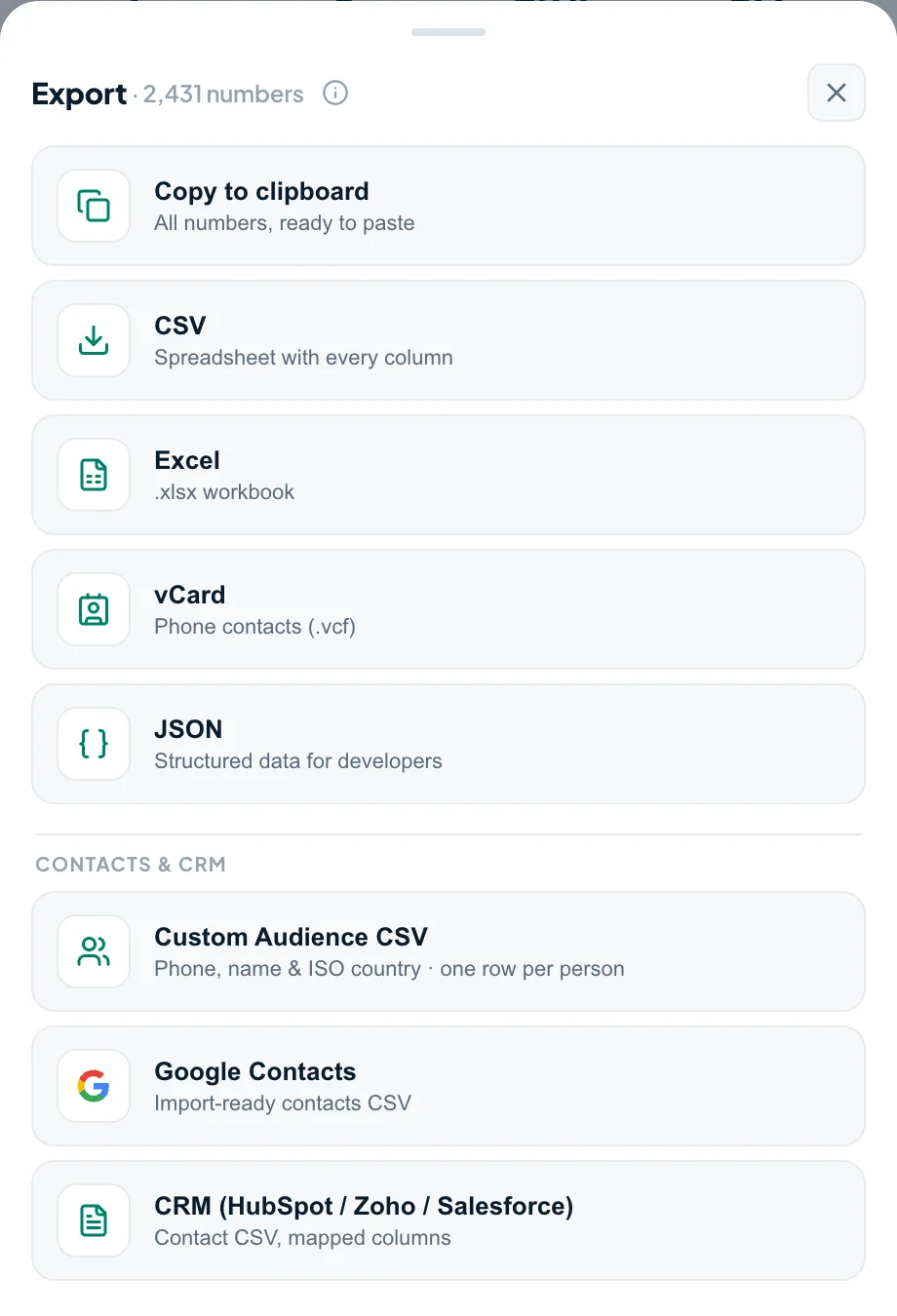
vCard (.vcf) drops straight into a phone's address book; CSV is the one to pick for Google Contacts. Both come from the same Export menu — no need to scan again. Moving to a basic phone that reads contacts from the SIM? Import the .vcf first, then copy the contacts to the SIM card.
Route B — via Google Contacts
- Export a CSV
Follow the same scan, then export CSV instead of vCard.
- Import into Google Contacts
At contacts.google.com, choose Import and pick your CSV. See the full Google Contacts guide for the exact field mapping.
- Sign in on the new phone
Add the same Google account to the new phone. Your contacts sync down automatically — and stay backed up for next time.
Which route should you pick?
If you just want the numbers on the new phone with the least fuss, Route A (vCard) is quickest. If you'd like a synced, backed-up copy that follows you to every future phone, Route B (Google Contacts) is worth the extra minute. Either way, Tooly does the hard part — turning WhatsApp's hidden contact list into a clean, importable file.
Switching from Android to iPhone (or iPhone to Android)
Changing between Android and iPhone is the moment people quietly lose numbers. WhatsApp's own Move to iOS and chat transfer carry your message history — but the people you only ever chatted with and never saved to your phone aren't phone contacts, so they don't come across. That list is exactly what Tooly rescues: scan on WhatsApp Web, export a vCard, and open it on the new iPhone (or Android), or send the CSV through Google Contacts so it syncs down on its own. The steps are the same in either direction — a vCard imports everywhere, so the platform you're leaving or joining doesn't matter.
Frequently asked questions
Will the names come across, not just the numbers?
Yes — a vCard carries each contact's name and number, so your new phone shows proper names, not raw digits.
Does this work for both iPhone and Android?
Yes. A .vcf imports into both. Via Google Contacts it syncs automatically to whichever phone you sign in on.
How do I transfer WhatsApp contacts from Android to iPhone?
Scan on WhatsApp Web with Tooly and export a vCard (.vcf). AirDrop or email it to the iPhone and open it, or import the CSV into Google Contacts and sign that account into the iPhone. Your WhatsApp numbers — including people you never saved — land in the new iPhone's address book. Free and on your device.
Does Move to iOS transfer my WhatsApp contacts?
It brings your chat history, not your WhatsApp-only contacts — anyone you chatted with but never saved won't appear on the new iPhone. Export them with Tooly first, then import the vCard so no number is left behind.
Do I need my old phone during the transfer?
Only to keep WhatsApp Web signed in while you export. After that, import on the new phone anytime.
Does this move my chats too?
No — Tooly moves contacts and numbers, not messages. Use WhatsApp's own chat backup for history; Tooly makes sure the people and numbers come with you. See backing up your contacts.
Is it free?
Yes — exporting your full list to vCard or CSV is free and unlimited, no account. Premium only adds extras like filters, the unique-numbers-only switch and presets.
Take your contacts with you
One scan becomes a vCard your new phone imports in seconds. Free, and entirely on your device.
Add Tooly to Chrome — free